

Is the “Second Brain” really effective for your productivity?
In the age of information overload, our biological memory is put to the test. Between constant notifications, articles to read “later,” and the need to synthesize complex projects, the feeling of cognitive overload has become the norm.
This is where the “Second Brain” concept (or Building a Second Brain), popularized by Tiago Forte, comes in.

More than just a personal development trend, this personal knowledge management (PKM) methodology promises to turn your brain into a creation engine.
But once the initial excitement of setting it up fades, does it actually work in the long term?
An analysis of a system that splits opinion between remarkable efficiency and the risk of digital bureaucracy.
What is a “Second Brain”?
In practical terms, a second brain is a centralized digital environment where you store, organize, and connect your knowledge. The central idea is simple: your brain is made to generate ideas, not to store them.
By offloading your resources (notes, articles, inspiration, reports) into a reliable external tool, you achieve two goals:
- Free up your working memory: By reducing the pressure on your biological brain, you gain mental clarity.
- Turn information into action: You do not store data for the sake of it, but to fuel your future projects.
The CODE method: the four pillars
For the system to work, it is not enough to copy and paste links into Notion. Tiago Forte recommends the CODE method:
- Capture: Keep only the “diamond” of information (what resonates with you).
- Organize: Apply a structure oriented toward present action (projects) rather than abstract categories.
- Distill: Summarize your notes so they can be understood in a few seconds during a future review.
- Express: Use these notes to create content, run projects, or make decisions.
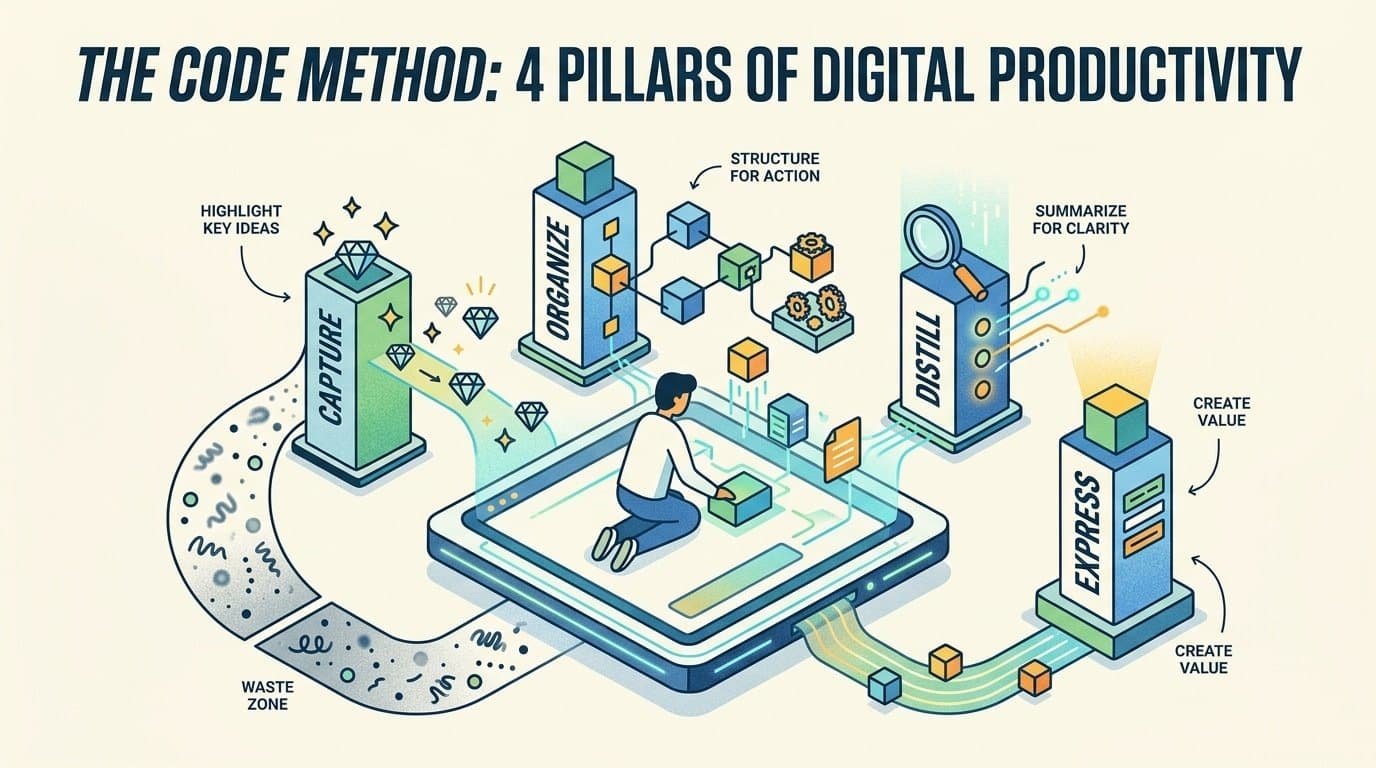
The second brain: real effectiveness or digital mirage?
The effectiveness of the second brain depends entirely on your internal discipline. The main risk is “collectionitis”: accumulating thousands of notes in a digital archive that eventually becomes a “dump” where information dies.
Concrete benefits
If you use it correctly, the benefits are measurable:
- Less stress about forgetting: You know your data is accessible with a search.
- Cross-project connections: You realize that what you learned in project A can help solve a problem in project B.
- Reduced startup time: Faced with a blank page, you are no longer alone; you have a foundation of research already ready to use.
Limits to anticipate
The system requires an initial investment.
If you spend too much time “organizing” (sorting, tagging, color-coding) and not enough time “producing,” the productivity gain is wiped out by the administrative overload you have imposed on yourself.

How can you build your system effectively?
The most common mistake is wanting to build a “perfect encyclopedia.” The golden rule is simple: only create a structure when you need it for an ongoing project.
Choosing the right tool for your profile
The software is only the medium, but some tools make certain uses easier:
- Notion: The choice of flexibility. Perfect for structuring projects with relational databases. Ideal if you manage tasks and notes in the same place.
- Obsidian: The choice of connection. Its ability to link notes together via bidirectional links makes it possible to surface ideas through serendipity. Very powerful for those who write a lot.
- Logseq or Heptabase: For those who prefer an approach based on “mind mapping” and visual thinking rather than linear folders.
Strategies to avoid system burnout
So that your second brain does not become a burden, adopt these three habits:
- The “Just-in-Time” principle: Do not classify things for the “just in case.” Only sort the information that helps you move forward on your current goals quarter by quarter.
- Fast capture: Your tool should be accessible in less than 3 seconds on mobile. If access is slow, you will not capture anything.
- Regular pruning: Give yourself permission to delete or archive radically. A second brain cluttered with obsolete information loses all value.
FAQ: Frequently Asked Questions About the Second Brain
1. Do you have to pay for a second brain tool?
Not necessarily. Tools like Obsidian (local personal use), Notion (very generous free version), or even native note apps (Apple Notes, Microsoft OneNote) are more than enough to get started. Financial investment does not guarantee productivity.
2. How much time per week should you dedicate to your second brain?
Ideally, a weekly 30-minute “review” session is enough to organize the week’s captures and clean up your notes inbox. If you spend more than an hour a day on it, you are managing your tool more than your projects.
3. Is it compatible with corporate work?
Yes, but with caution. It is crucial to keep your personal notes separate from your confidential professional data. Use dedicated workspaces and always comply with your organization’s IT security policies.
4. Does the second brain replace memory?
No, it complements it. The goal is not to stop learning anything, but to unload raw data from your brain so it can focus on synthesis, analysis, and creativity. Your memory will work better if it is focused on concepts rather than technical details.